Every plan
Lowest Delta Total
Lowest Delta Total adds up how far each generated number lands from its drawing. Lowest Delta Total is the fastest method, and the only one whose seeds can go into the public library.
Seed Crunch is a desktop companion app for Lotto Seed that crunches through billions of seeds to discover winning patterns for any lottery game. Seed Crunch runs on Windows and Linux and works with every Lotto Seed plan.
seedcrunchseedcrunch --host 0.0.0.0Seed Crunch tests random number generator seeds and offsets by the billions and keeps the ones whose numbers line up best with the past drawings you pick. Seed Crunch scores every candidate with one of seven methods and sends the best results to your Lotto Seed account.
Lotto Seed describes every drawing as one number: where its combination falls among all the combinations the game can draw. A seed is the starting number of a random number generator, and an offset is how far into its sequence you start reading.
Create an access token on Lotto Seed under Seed Crunch → Access Tokens and paste the token into Seed Crunch.
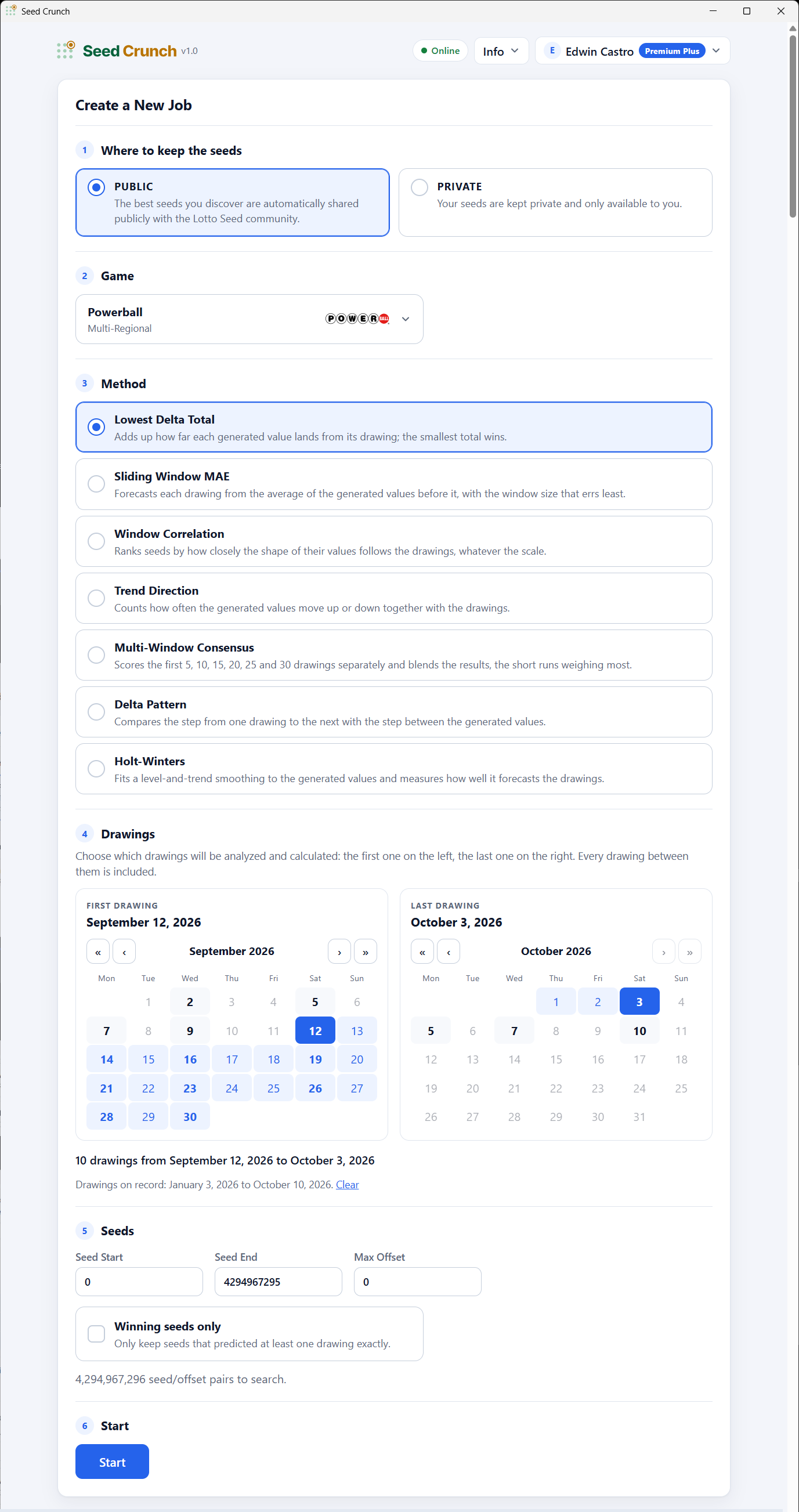
Pick a game, the range of past drawings to test, and one of the seven methods for comparing seeds.
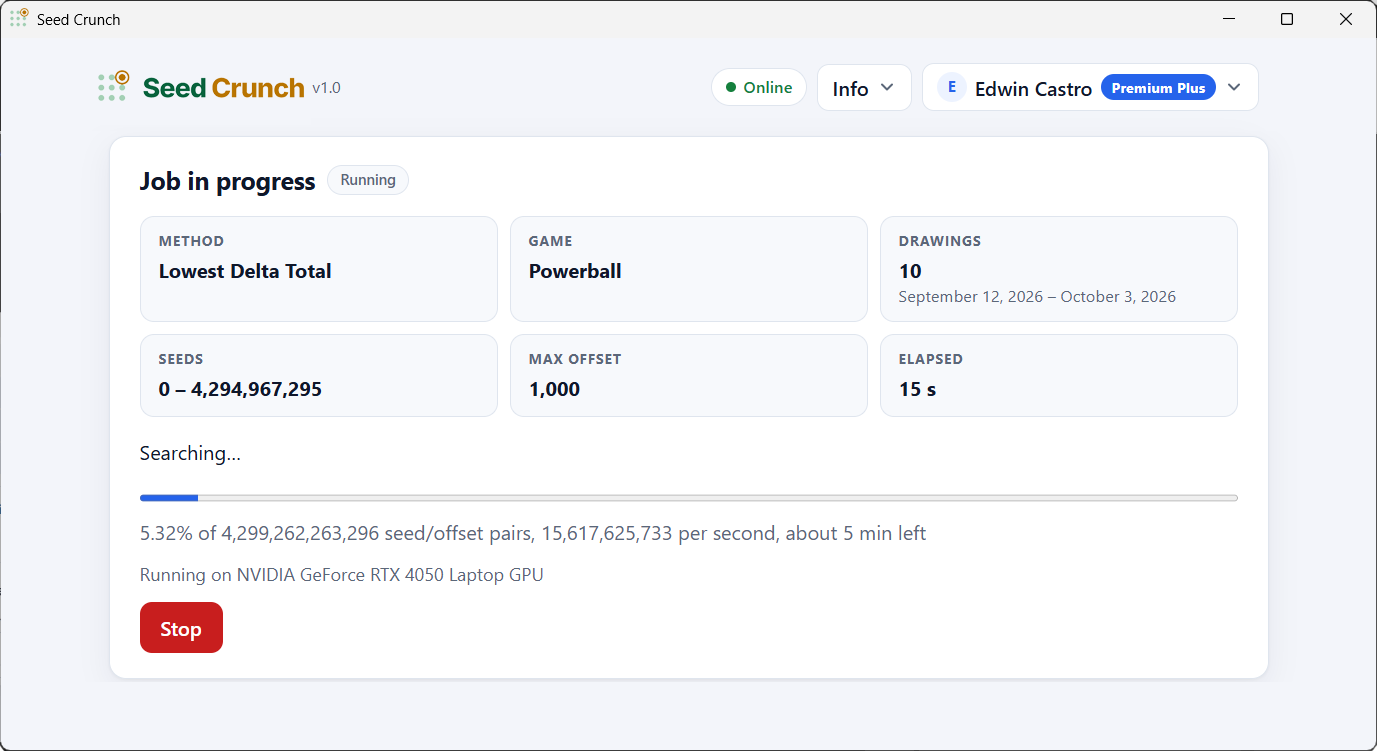
Seed Crunch tests every seed and offset in your range and keeps only the best results.
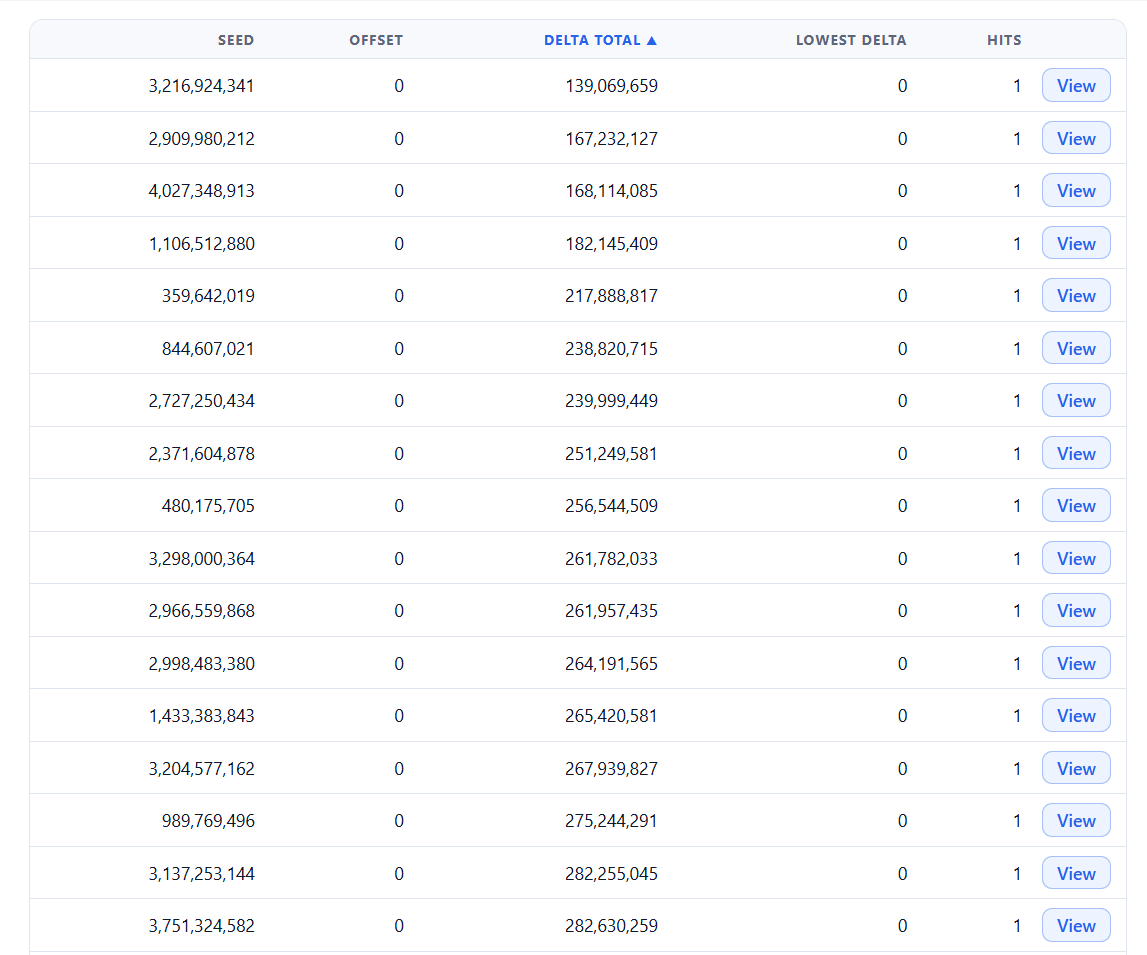
Your best seeds go to the public community library on a Free or Premium plan, or stay private with you on a Premium Plus plan.
Seed Crunch offers seven methods for scoring how closely a seed's numbers match the drawings you chose. Lowest Delta Total is included with every Lotto Seed plan, and the other six methods need Premium Plus. Every result also shows its Hits: the number of jackpot drawings the seed predicted exactly.
Lowest Delta Total adds up how far each generated number lands from its drawing. Lowest Delta Total is the fastest method, and the only one whose seeds can go into the public library.
Sliding Window MAE predicts each drawing from the average of the numbers just before it, and keeps the window size that misses least. One odd drawing won't throw Sliding Window MAE off.
Window Correlation looks at the shape of the sequence rather than the exact numbers: do the seed's numbers rise and fall in the same pattern as the drawings?
Trend Direction only asks whether each step goes up or down along with the drawings, whatever the size of the move. Trend Direction is simple and very hard to fool.
Multi-Window Consensus scores the first 5, 10, 15, 20, 25 and 30 drawings and blends the results. A seed has to do well at every length to rank.
Delta Pattern compares the jump from one drawing to the next with the jump between generated numbers, so Delta Pattern measures how things change rather than the values themselves.
Holt-Winters fits a smoothed level-and-trend forecast to the seed's numbers and checks how well the forecast predicts each drawing. Holt-Winters is the most thorough method, and by far the slowest.
Most people use the Seed Crunch app window. If you would rather start Seed Crunch from a terminal, or run Seed Crunch remotely on a computer without a screen, the command line has you covered.
First time? Log in to lottoseed.com, go to Seed Crunch → Access Tokens and create a token for each computer you use. Then paste the token into Seed Crunch.
The Seed Crunch home screen walks you through six steps to create a job:
The seedcrunch command is the same as opening Seed Crunch from your desktop, and closing the window quits the app. On Windows the command is seedcrunch.exe.
seedcrunchThe --host option starts Seed Crunch without a window and listens on port 6334. Open http://localhost:6334/ on the same computer, or its network address from another one.
seedcrunch --host 0.0.0.0--host on a network you trust.The --port option changes the port Seed Crunch listens on.
seedcrunch --host 0.0.0.0 --port 8080The --log option saves seedcrunch.log in the Seed Crunch folder and prints where the log is.
seedcrunch --logSeed Crunch works with every Lotto Seed membership, and what you can run follows your plan. Free and Premium members get Lowest Delta Total on the newest 30 drawings; Premium Plus unlocks all seven methods, every drawing in a game's history and up to 1,000 results per job.
Short, complete answers to the questions people ask most about Seed Crunch, its requirements and its plans.
Seed Crunch 1.0 is a desktop companion app for Lotto Seed (lottoseed.com) that tests billions of random number generator seeds and offsets to find the ones whose numbers best match the past drawings of any lottery game. Seed Crunch runs on 64-bit Windows 10, Windows 11 and Linux, is fastest with an NVIDIA graphics card, and works with every Lotto Seed plan.
Seed Crunch tests random number generator seeds and offsets by the billions and keeps the ones whose numbers line up best with the past drawings you pick. Seed Crunch scores every candidate with one of seven methods and sends the best results to your Lotto Seed account. A seed is the starting number of a random number generator, and an offset is how far into its sequence Seed Crunch starts reading.
Seed Crunch supports 64-bit Windows 10 and Windows 11, and 64-bit Linux distributions including Ubuntu 22.04, 24.04 and 26.04 LTS, Debian 12 and 13, Linux Mint 21 and 22, Pop!_OS 22.04 and 24.04, Fedora 43 and 44, Arch Linux, openSUSE Tumbleweed and openSUSE Leap 15.6 and 16.0. Seed Crunch requires an Intel or AMD processor.
No. Seed Crunch has no macOS version and does not run on ARM processors such as Apple silicon, Windows on ARM, Linux on ARM or Raspberry Pi.
No. Seed Crunch runs on any supported computer, but it is much faster with an NVIDIA graphics card from the GeForce GTX 900 series up to the RTX 50 series. GPU acceleration needs NVIDIA driver 528.33 or newer on Windows, or 525.60.13 or newer on Linux. No CUDA Toolkit is needed.
Yes. Seed Crunch signs in with a Lotto Seed access token. Log in to lottoseed.com, go to Seed Crunch → Access Tokens and create a token for each computer you use. Then paste the token into Seed Crunch. Seed Crunch works with the Free, Premium and Premium Plus plans.
On Free and Premium plans, Seed Crunch runs the Lowest Delta Total method on a game's newest 30 drawings, sends the best 10 results of each job to Lotto Seed, and saves seeds to the public library. On Premium Plus, Seed Crunch runs all seven methods on any drawing in the game's history, sends up to 1,000 results of each job, and lets you choose between the private and the public library.
The seven Seed Crunch methods are Lowest Delta Total, Sliding Window MAE, Window Correlation, Trend Direction, Multi-Window Consensus, Delta Pattern, Holt-Winters. Lowest Delta Total is included with every plan, and the other six methods need Premium Plus.
Hits is the number of jackpot drawings a seed predicted exactly. The Winning seeds only filter keeps only seeds with at least one hit.
Yes. Run the Seed Crunch .deb or tar archive with seedcrunch --host 0.0.0.0 and Seed Crunch listens on port 6334 instead of opening a window. Then open the server's address on port 6334 in a browser on another computer. Anyone who can reach that port can use the app, so only do this on a network you trust.
Run seedcrunch --log. Seed Crunch saves seedcrunch.log in the Seed Crunch folder and prints where the log file is.
Seed Crunch 1.0 is a free download for 64-bit Windows and Linux, as a Windows .exe, a Linux .deb package, a Linux AppImage or a Linux tar archive. You'll also need a Lotto Seed account to sign in.
No installer and nothing else to install. Download seedcrunch.exe and run it.
Runs on: Windows 11, Windows 10 (64-bit)
Download .exeInstall with apt, which also installs the app window's engine (WebKitGTK).
Runs on: Ubuntu 22.04, 24.04 and 26.04 LTS; Debian 12 and 13; Linux Mint 21 and 22; Pop!_OS 22.04 and 24.04
Download .debMake the file executable and run it.
Runs on: Everything the .deb covers, plus Fedora 43 and 44, Arch Linux, openSUSE Tumbleweed, openSUSE Leap 15.6 and 16.0
Download AppImageFor servers, or if you prefer no AppImage. Unpack it and run seedcrunch/seedcrunch.sh.
Runs on: The same as the AppImage
Download .tarwebkit2gtk4.1 on Fedora, webkit2gtk-4.1 on Arch, libwebkit2gtk-4_1-0 on openSUSE). The .deb package installs WebKitGTK for you.